To delete logs:
Step 1: Access the AkaBot Center database.
Step 2: Run the following script:
USE aka_orchestrator;
GO

DECLARE @BatchSize INT = 5000;
DECLARE @KeepDays INT = 30;
DECLARE @DeletedRows INT = 1;

WHILE @DeletedRows > 0
BEGIN
    DELETE TOP (@BatchSize)
    FROM dbo.log
    WHERE time_stamp < DATEADD(DAY, -@KeepDays, GETDATE());

    SET @DeletedRows = @@ROWCOUNT;

    WAITFOR DELAY '00:00:01';
END
Note: Depending on different environments, please adjust the following variables accordingly:
aka_orchestrator: Schema nameKeepDays: Number of log retention days (the above script keeps logs from the latest 30 days)
Result:
The logs will be deleted from the database.
Step 3: Synchronize data between AkaBot Center and the database.
Method 1:
Access the following URL:
Example:
http://pb.akabot.io:8080/#/admin/docs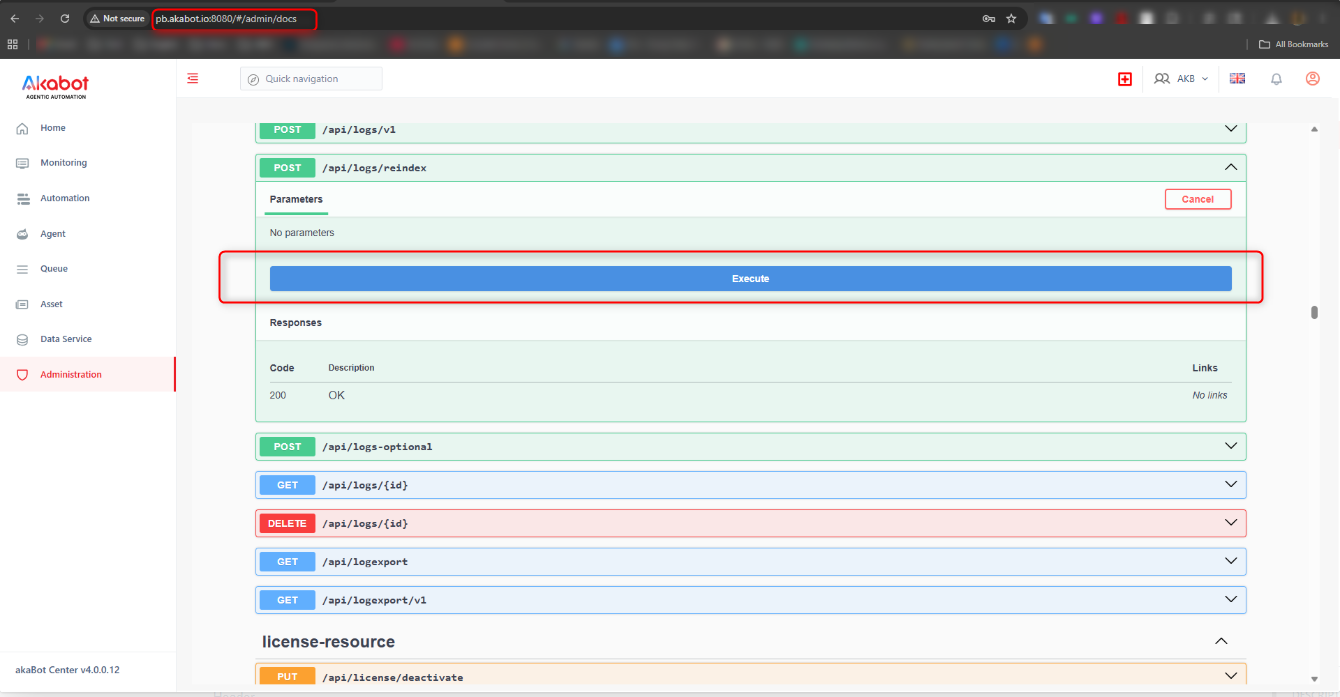
- Click button "Execute"
Method 2:
Call the API using tools such as Postman.
Example:
http://localhost:8080/api/logs/reindexhttp://localhost:8080/api/logs/reindex- method POST
- Header
Authorization: Bearer tokenadmin*Note: Please replace the domain with the customer’s actual domain.
Step 4: Wait approximately 1–2 minutes, then verify the result again on AkaBot Center.
Was this article helpful?
That’s Great!
Thank you for your feedback
Sorry! We couldn't be helpful
Thank you for your feedback
Feedback sent
We appreciate your effort and will try to fix the article